Before & After
Upgrade your Depop listing photos
Turn quick phone shots into clean, consistent product imagery
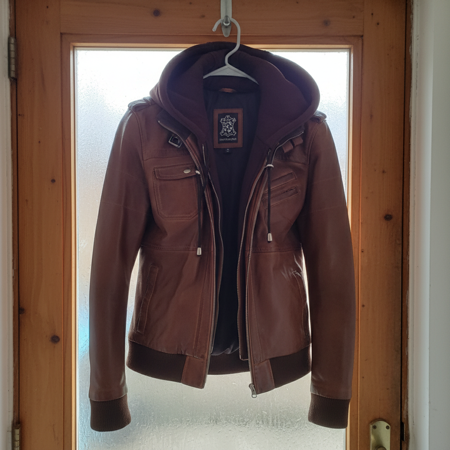 Original
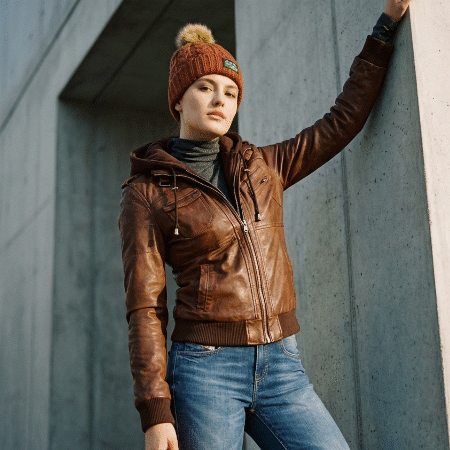 SnapSell.photo
Learn the tricks top Depop sellers use to create scroll-stopping listing photos. SnapSell.photo helps you remove clutter, add consistent styling, and build lifestyle shots that drive more clicks in minutes.
Turn quick phone shots into clean, consistent product imagery
Original
SnapSell.photo
Better photos mean faster sales and stronger pricing on Depop
Professional visuals increase perceived value so you can list higher and negotiate less.
Generate clean backgrounds and lifestyle shots in seconds without a studio setup.
Eye-catching listing images improve click-through rates and increase saves.
Keep all your Depop listings visually cohesive with matching lighting and framing.
Create standout imagery for your best-selling items
The best-selling Depop shops have one thing in common: consistent, clean, eye-catching photos. Depop's algorithm favours listings with high save-to-view ratios, and strong visuals are the biggest driver of saves.
Use natural daylight where possible, keep backgrounds simple and uncluttered, and photograph from a consistent angle across all your listings. For clothing, flat lays on a plain surface or hangers against a clean wall work well. For accessories, try close-up shots that show detail and texture.
Pro tip: Depop's search results display small thumbnails. Make sure your main image is bold and uncluttered so it stands out at a glance. SnapSell.photo can automatically clean up backgrounds and create consistent, thumbnail-friendly images across your entire shop.
Consistency matters more than perfection. Buyers are drawn to shops that feel curated and cohesive. Using the same background style, lighting, and framing across your listings builds trust and makes your shop look professional, even if you're photographing from your bedroom.
Depop shoppers skim small thumbnails, so a messy bedroom or busy pattern behind the item costs you the click. White, light grey, or a solid pastel keeps the product as the only thing in the frame.
You do not need a sweep or a lightbox. Photograph in daylight against the plainest wall you have, then let SnapSell.photo remove the leftover clutter and match that background across the rest of the shop.
Try SnapSell.photo free and transform your listing photos in minutes.
Start Free on SnapSell.photo